We have another substantial update on the way for Accelerator, with many of the new features also available across MobileX and our new Pivot integration where relevant.
We will be officially launching Pivot at the Sage 300 Action Group ISV Session taking place on Friday, 13th November, from 10.30 IST to 11.30pm IST.
This releases listed below bring improvements to Outlook and calendar integration, email matching, notes, transcription, file handling and the overall user experience, alongside a number of fixes and technical enhancements.
Outlook Calendar Integration
Connect your Microsoft 365 Outlook Calendar with CRM, making it easier to work with appointments across both systems.
Users can add Outlook calendar appointments to CRM, or create appointments in CRM and add them to Outlook.
A new CompanyOfficeIntAppt screen also allows administrators to define what information is included in the appointment body.
Available for: Accelerator, MobileX, Pivot
Improved Conversation Matching
Email filing is getting smarter with conversation matching.
Once enabled, filed emails store the conversation ID and use this to help match subsequent emails in the same conversation, providing more reliable context when filing email threads.
To enable this feature in Sage CRM, create the following field on the Communication table:
comm_ctconversationid
Type: Text
Length: 255
Smarter Email Recognition
Email inputs can now extract an email address from surrounding text, making matching and data entry more forgiving.
We have also introduced an optional AI-assisted email/signature reader to help identify information contained within an email signature. The user remains in control and must manually submit the information before anything is added.
Notes – Add & Edit
Notes can now be both added and edited, making it easier to keep CRM information current while working away from the main Sage CRM interface.
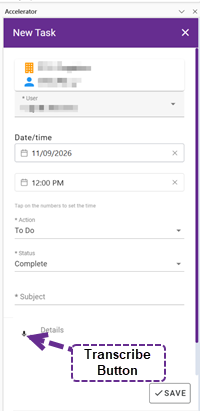 Transcribe as You Work
Transcription has been extended throughout the interface, with a Transcribe button now available on text areas.
When adding a task, users can also record and transcribe information and upload the original recording in .webm format.
Smarter Library Actions
File formats within the Library can now have their own custom actions.
For example, a .webm recording can display a Play button, allowing the recording to be accessed directly from the Library.
We have also improved the error message displayed when a Library file cannot be found.
Drag, Drop & Paste Files
Adding files and images is becoming quicker.
Users can now drag and drop files, or use Ctrl+V to paste files and images. The appropriate upload dialog will then open to complete the process.
Company & Person Images
Image pickers are now available for Company and Person records, making it easier to add and manage record images.
Mail Merge from CRM Entities
Mail Merge can now be added as a custom action on CRM entities.
This requires the CRM Together Mail Merge Client to be installed.
Merge to HTML Templates
Users can merge information directly into HTML templates from within the app, with options such as saving the finished document as a PDF.
History Screen Update
The History screen has received a UI refresh, improving how historical CRM information is presented and making it easier to work with.
Better Select Screens
We have improved the appearance and usability of Read More / Read Less when working with select screens, providing a cleaner experience when viewing longer selections.
Improved iPad & Wider Device Support
A display issue that could cause the Lists menu to disappear on wider devices, including some iPads, has been fixed.
Sage CRM Time Settings
Accelerator now respects the Sage CRM UserUseAMPM setting within the time picker, ensuring the time format follows the user’s CRM configuration.
Message In / Message Out
Message In and Message Out have been added to metadata.
This can be used from the Log Call screen when the Message option is selected and can also be manually added to Sage CRM as a comm_action option.
Microsoft App Proxy Support
Support for Microsoft Application Proxy has been added, providing additional deployment options for organisations using Microsoft infrastructure.
Recent Outlook Add-in Updates
Outlook Add-in 2.4.4.8 – 8 September 2026
The Outlook clients have been updated so that links now open using the user’s default browser.
We have also fixed handling of custom URIs, including links such as mailto: and Custom Mail Merge links.
Outlook Add-in 2.4.4.7 – 19 August 2026
A new Outlook add-in release was made available to address instances where users experienced a grey screen within the add-in.
Email Filing Updates
Version 6.0.2.9 – 25 August 2026
An over-the-air API update provided a further fix for an issue introduced in 6.0.2.7 where filing an email did not correctly set the cmli_comm_personid matching the sender’s email address when working with custom entities.
Version 6.0.2.8 – 25 August 2026
An over-the-air API update fixed an issue introduced in 6.0.2.7 where filing an email did not correctly set the cmli_comm_personid matching the sender’s email address.
Mail Merge Client 4.7.7.5 – 31 July 2026
A number of improvements were made to Mail Merge replies and forwards:
- Reply and Reply All no longer include attachments from the original email. Attachments are retained only when using Forward.
- The original email header – including From, To and related information – now uses the appropriate Sage CRM translations.
- The Sent date within the header is formatted to more closely match Outlook, for example: Wednesday 29 July 2026 12:58.
Outlook Add-in Updates – 29–31 July 2026
A Microsoft Edge update caused issues with locally installed Outlook add-ins. Updates were released to address the problem.
Further information is available in our article Edge update breaking local installed add-ins.
Our products are constantly evolving and many of these enhancements come directly from feedback from our partners and customers.
If there is something you would like to see added or improved in Accelerator or MobileX please let us know – we are always interested in hearing how we can make working with Sage CRM easier.